3MF File Explained: What It Is, How to Open It, and Why It Beats STL
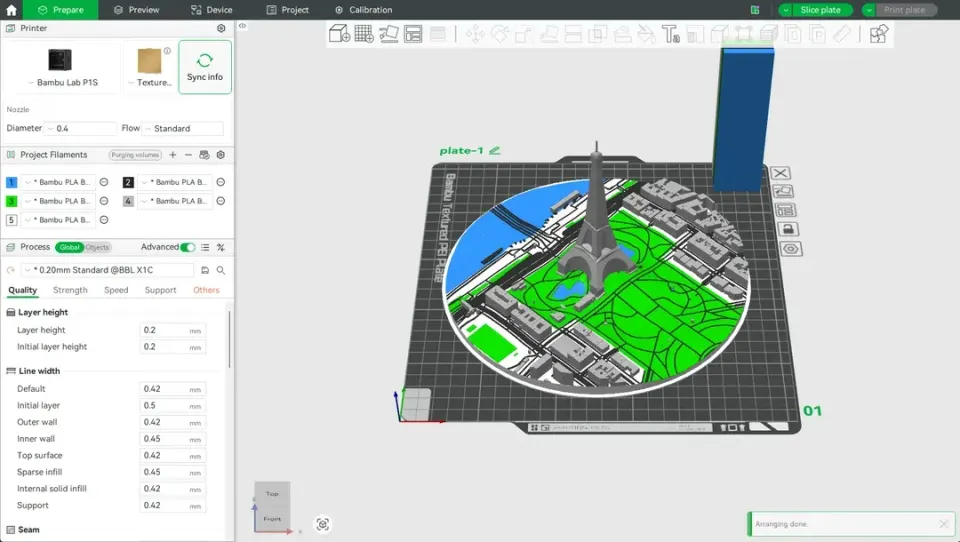
You downloaded a model from Printables or MakerWorld, and the file ends in .3mf instead of the .stl you expected. Or maybe you saved a project in Bambu Studio and noticed it saved as a 3MF file by default. What is this format, and should you care?
Short answer: yes. The 3MF file format is a modern replacement for STL that keeps your model, colors, print settings, and materials all in one tidy package. In this guide, you'll learn what's inside a 3MF file, how to open it in any slicer or CAD program, and how to convert it when you need to.
What Is a 3MF File?
A 3MF file (3D Manufacturing Format) is a file format designed specifically for 3D printing. It was created by the 3MF Consortium — a group that includes Microsoft, HP, Autodesk, Stratasys, and others — to solve the limitations of the aging STL format.
Think of a 3MF file as a complete project package rather than just a shape. While an STL file only stores the raw geometry (a mesh of triangles), a 3MF file bundles together:
- 3D model geometry (the shape itself)
- Color and texture data (multi-color prints in one file)
- Material assignments (which part uses PLA vs PETG)
- Print settings (layer height, speed, temperature, supports)
- Thumbnail preview (so you can see the model without opening it)
- Build plate layout (exact positioning and orientation)
This is why Bambu Studio, PrusaSlicer, and many model-sharing platforms now use 3MF as their default save format. When someone shares a 3MF file, you get their exact print profile — not just the model.
What's Inside a 3MF File?
Here's something most beginners don't know: a 3MF file is actually a ZIP archive with a different extension. You can rename any .3mf file to .zip, unzip it, and see exactly what's inside.
Diagram showing the internal structure of a 3MF file: a ZIP archive containing model data, textures, print settings, thumbnails, and material info
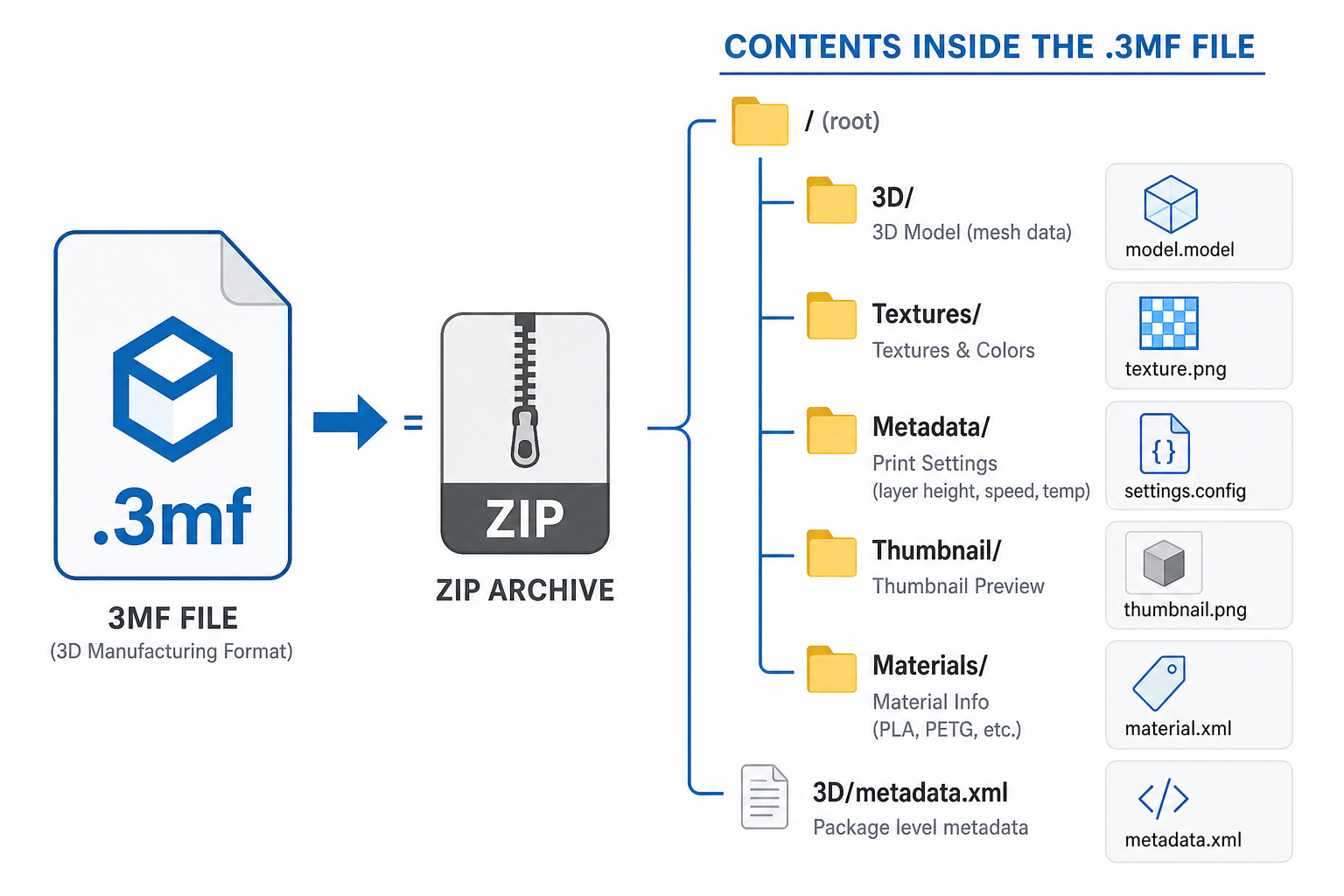
A typical 3MF file contains:
Folder / File | What It Stores |
|---|---|
| The mesh geometry in XML format |
| Print settings (layer height, infill, speed, temperature) |
| Preview images of the model |
| Color maps or surface textures (if multi-color) |
| File type definitions for the package |
This structure is why a 3MF file can carry so much more information than an STL — it's not one flat file, it's a structured container.
Try it yourself: Take any .3mf file from Bambu Studio, rename it to .zip, and extract it. You'll see the folders listed above. It's a great way to understand what your slicer is actually saving.
3MF vs STL: Which Is Better?
If you've been around 3D printer file types for a while, you know STL has been the standard since the 1980s. But 3MF is better in almost every way. Here's the comparison:
Feature | 3MF | STL |
|---|---|---|
Geometry data | Yes | Yes |
Color / texture | Yes | No |
Material info | Yes | No |
Print settings | Yes | No |
Multi-part assemblies | Yes | No (separate files) |
File size | Smaller (compressed) | Larger (uncompressed) |
Thumbnail preview | Yes | No |
Error-free mesh guarantee | Yes (self-healing spec) | No (common errors) |
Universal compatibility | Growing | Everywhere |
The verdict: A 3MF file is objectively better for 3D printing workflows. The only reason STL still dominates is legacy compatibility — every slicer, every platform, and every CAD tool speaks STL. But 3MF support is catching up fast, and for sharing print-ready projects (especially multi-color or multi-material), 3MF is the clear winner.
That said, if you're just downloading a single-color model to print with default settings, STL still works perfectly fine. You don't lose anything important.
How to Open a 3MF File
The good news: most modern 3D printing software already supports 3MF files natively. Here's a breakdown of what will open a 3MF file.
Slicer Software (Recommended)
These 3MF file programs are your best bet for opening and printing 3MF files:
Bambu Studio — Fully supports 3MF (it's the native project format). Just double-click the file or use File → Open. All settings, colors, and plate layouts are preserved.
PrusaSlicer — Full 3MF support. Drag and drop or File → Import. If the 3MF contains print profiles, PrusaSlicer will load them.
Cura — To open a 3MF file in Cura, go to File → Open File(s) and select your .3mf. Cura reads the geometry and basic settings, though some Bambu-specific settings may not transfer perfectly since Cura uses its own profile system.
OrcaSlicer — Full support (it's based on Bambu Studio's codebase).
CAD Software
If you want to edit the model (not just print it):
Fusion 360 — Can open a 3MF file for viewing and basic mesh editing. Go to File → Open → select .3mf. Note that Fusion 360 treats it as a mesh body, not a solid — you'll need to convert it if you want parametric editing.
SOLIDWORKS — Supports 3MF file import starting from SOLIDWORKS 2019. Go to File → Open → change file type filter to "3D Manufacturing Format (.3mf)". Like Fusion, it imports as a mesh.
Microsoft 3D Builder — Free, pre-installed on Windows. Opens 3MF files with full color support. Good for quick viewing and basic edits.
3MF File Viewer Online
Don't want to install anything? These online tools let you view a 3MF file in your browser:
- 3D Viewer Online (3dviewer.net) — drag and drop any 3MF file
- Creators 3D Viewer — browser-based, supports colors and textures
- Windows 3D Viewer — built into Windows 10/11 (not online, but pre-installed)
These viewers are handy for quickly checking what's inside a file before committing to a full slicer import.
How to Convert a 3MF File to STL
Sometimes you need an STL instead — maybe you're uploading to a platform that doesn't accept 3MF, or you're using an older slicer. Converting 3MF to STL is straightforward, but keep in mind you'll lose color, material, and settings data in the process.
Method 1: Export from Your Slicer
The easiest way to convert 3MF to STL:
- Open the 3MF file in Bambu Studio, PrusaSlicer, or Cura
- Select the model on the build plate
- Go to File → Export → Export STL (or "Export plate as STL")
- Save the .stl file
This preserves the geometry perfectly and is the most reliable method.
Method 2: Use Fusion 360
If you have Fusion 360 installed:
- File → Open → select your .3mf file
- Right-click the mesh body → Save As Mesh
- Choose STL as the output format
Method 3: Online Conversion Tools
For quick one-off conversions without installing software:
- Convertio (convertio.co) — upload 3MF, download STL
- AnyConv — browser-based, free
Important: When you convert a 3MF file to STL, you lose everything except the raw geometry. No colors, no materials, no print settings. It's a one-way downgrade — you can't convert STL back to 3MF and magically get those features back.
Where to Download 3MF Files
Looking for ready-to-print 3MF files? These platforms offer models in 3MF format:
MakerWorld (makerworld.com) — Bambu Lab's model platform. Most models are available as 3MF with optimized Bambu Studio settings pre-loaded. Great for plug-and-play printing.
Printables (printables.com) — Prusa's platform. Large library of 3MF file downloads, especially for multi-color prints and Prusa-optimized profiles.
Thangs (thangs.com) — Search engine for 3D models. Filters let you find 3MF files specifically.
Cults3D (cults3d.com) — Mix of free and paid models, many designers upload 3MF alongside STL.
For more sources, check our guide to free 3D print files and Thingiverse alternatives that support modern formats.
Pro tip: When downloading a 3MF file from MakerWorld or Printables, the print settings inside are tuned for the uploader's specific printer. If you have the same printer (or same brand), you can often print with zero adjustments. If your printer is different, import the 3MF, keep the model, but apply your own print profile.
When 3MF Falls Short (Limitations)
3MF is excellent, but it's not perfect for every situation:
CAD editing is limited. A 3MF file stores mesh data, not parametric solid geometry. If you need to modify dimensions, add holes, or redesign features, you need the original CAD file (STEP, F3D, or native format). A 3MF file is not a CAD file — it's a manufacturing-ready format.
Cross-slicer compatibility isn't perfect. A 3MF saved in Bambu Studio with AMS color assignments may not translate perfectly when opened in Cura or PrusaSlicer. The geometry transfers fine, but brand-specific settings (like Bambu's flow calibration or plate type) may be ignored.
Some platforms don't accept 3MF uploads. Older platforms like Thingiverse still primarily work with STL. If you're sharing a model there, you'll need to export an STL version.
Older slicers may not support it. If you're running Cura 3.x or an outdated version of another slicer, 3MF support may be missing or incomplete. Update to the latest version.
File size can be larger for complex multi-material projects. While basic 3MF files are actually smaller than equivalent STLs (thanks to ZIP compression), a 3MF with embedded textures, multiple plate layouts, and dozens of settings can grow large.
FAQ
What will open a 3MF file?
Most modern slicer software opens 3MF files natively: Bambu Studio, PrusaSlicer, Cura, and OrcaSlicer all support it. For CAD editing, Fusion 360 and SOLIDWORKS can import 3MF. For quick viewing without software, Windows 3D Builder (pre-installed on Windows) or online tools like 3dviewer.net work well.
Is 3MF better than STL?
Yes, for 3D printing purposes. A 3MF file stores color, material, print settings, and thumbnails alongside the geometry — STL only stores the raw shape. 3MF files are also typically smaller and include error-checking that prevents broken meshes. The only advantage STL still has is wider compatibility with older tools.
How do I change 3MF to STL?
Open the 3MF file in any slicer (Bambu Studio, PrusaSlicer, or Cura) and use File → Export → Export as STL. You can also use free online converters like Convertio. Keep in mind that converting 3MF to STL strips out all color, material, and settings data — only the geometry is preserved.
Is 3MF a CAD file?
No. A 3MF file stores mesh geometry (triangles), not parametric solid data. You can view and slice it for printing, but you can't easily modify dimensions or features the way you would in a CAD file like STEP or a native Fusion 360 file. Think of 3MF as a "print-ready package" rather than a design file.
Want to understand how 3MF fits into the bigger picture? Our complete guide to 3D printer file types breaks down every format — from STL and OBJ to STEP and G-code — and when to use each one. Looking for models to print? Browse our list of things to 3D print for inspiration.


Comments ()